> ## Documentation Index
> Fetch the complete documentation index at: https://docs.contextforce.com/llms.txt
> Use this file to discover all available pages before exploring further.
# Chat Editor
> Chat Editor is a tool that allows you to chat with the content of the webpage, youtube video, google search result and image. You can also use it to chat with the context of the webpage, youtube search result and image.
Access powerful chat features with keyboard shortcuts:
* `/` - Smart Prompt Access
* `@` - Knowledge Base Integration
* `#` - Tag-Based Retrieval
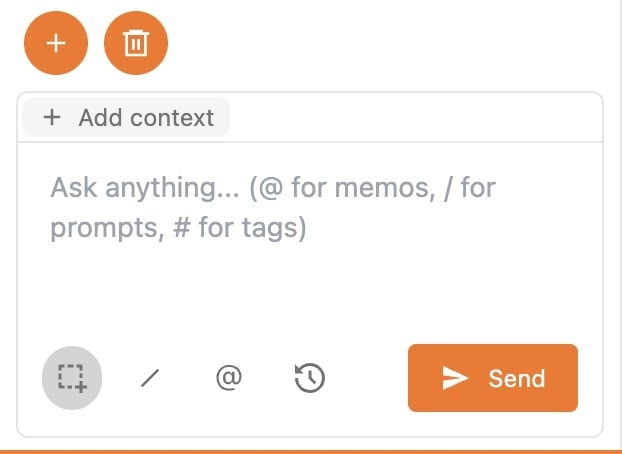 ## Key Features:
Access your customized prompt library instantly with a single keystroke
* • Type `/` to open your prompt library
* • Customize and modify prompts in real-time
* • Save time with pre-configured templates
Leverage your personal knowledge base seamlessly in any conversation
* • Access saved content with `@` or the Add Context button
* • Search and reference your knowledge base directly
* • Build conversations with your accumulated insights
Access your highlights and notes through an intuitive tagging system
* • Use `#` to browse all highlight tags
* • Find specific content and notes instantly
* • Keep information organized with custom tags
### Screenshots
Transform any visual content into actionable insights
* • Capture screenshots with one click
* • Get instant AI analysis of visual content
* • Reference images directly in the chat
### Model Selection
Customize your AI interaction by choosing the perfect model for your needs:
* Switch between different AI models on-demand
* Optimize for different types of queries
* Customize your interaction based on task requirements
***
## Workflow Enhancement
These features combine to create a powerful, intuitive chat experience:
Quick access to prompts and saved content reduces repetitive typing and searching
Seamlessly incorporate your knowledge base and highlights into conversations
Switch between models and chat histories to optimize for different tasks
Screenshot capability brings visual context directly into your conversations
**Pro Tip**: Combine features for maximum efficiency and create comprehensive, context-rich queries!
## Key Features:
Access your customized prompt library instantly with a single keystroke
* • Type `/` to open your prompt library
* • Customize and modify prompts in real-time
* • Save time with pre-configured templates
Leverage your personal knowledge base seamlessly in any conversation
* • Access saved content with `@` or the Add Context button
* • Search and reference your knowledge base directly
* • Build conversations with your accumulated insights
Access your highlights and notes through an intuitive tagging system
* • Use `#` to browse all highlight tags
* • Find specific content and notes instantly
* • Keep information organized with custom tags
### Screenshots
Transform any visual content into actionable insights
* • Capture screenshots with one click
* • Get instant AI analysis of visual content
* • Reference images directly in the chat
### Model Selection
Customize your AI interaction by choosing the perfect model for your needs:
* Switch between different AI models on-demand
* Optimize for different types of queries
* Customize your interaction based on task requirements
***
## Workflow Enhancement
These features combine to create a powerful, intuitive chat experience:
Quick access to prompts and saved content reduces repetitive typing and searching
Seamlessly incorporate your knowledge base and highlights into conversations
Switch between models and chat histories to optimize for different tasks
Screenshot capability brings visual context directly into your conversations
**Pro Tip**: Combine features for maximum efficiency and create comprehensive, context-rich queries!